
Remote Work Revolution: Crafting a Professional Home Office in Bahrain
The modern workplace is evolving, and Bahrain is no exception. The traditional 9-to-5 grind is giving way to a more flexible, remote-centric approach, but many Bahraini professionals struggle to create effective home offices. This guide provides a comprehensive roadmap for designing and optimizing your remote workspace in Bahrain, covering everything from ergonomics and technology to legal considerations and productivity tips.
Introduction: The Rise of Remote Work in Bahrain
Remote work is no longer a perk; it's a necessity for many. It offers increased flexibility and autonomy, and it's rapidly changing the way Bahrainis approach their careers.
Brief overview of remote work trends globally and in Bahrain.
Globally, remote work has experienced exponential growth, with projections estimating that 70% of the workforce will be working remotely by 2025 (Source: Global Workplace Analytics). In Bahrain, while adoption is still evolving, companies are increasingly recognizing the benefits of remote work policies, mirroring global trends. A recent survey by the Bahrain Economic Development Board indicated that 45% of Bahraini companies now offer some form of remote work option.
Why remote work is gaining popularity in Bahrain (cost savings, talent access, flexibility).
The appeal of remote work in Bahrain stems from several factors:
- Cost Savings: Companies can reduce overhead costs associated with office space. Employees save on commuting expenses and potentially on childcare.
- Talent Access: Remote work allows Bahraini companies to tap into a global talent pool, attracting skilled professionals regardless of location.
- Flexibility: Employees enjoy greater control over their schedules, leading to improved work-life balance and reduced stress.
- Increased Productivity: Studies show that remote workers are often more productive, reporting a 1.4x increase in output compared to office-based employees (Source: Stanford University Study).
The importance of a dedicated home office for productivity and well-being.
A dedicated home office is crucial for success in a remote work environment. It provides a designated workspace, separating work from personal life, minimizing distractions, and fostering a professional mindset. Without a dedicated space, blurring lines can lead to burnout and decreased productivity.
Setting the stage: This guide's purpose and target audience.
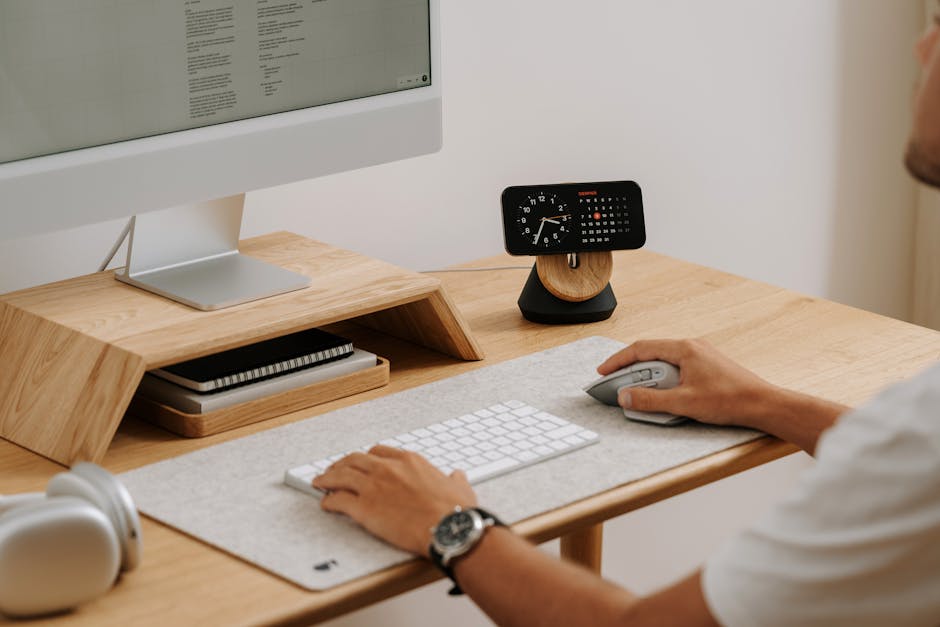 Image: A clean and modern desk setup featuring a computer, clock, and accessories in a home office.
This guide is designed for Bahraini professionals, entrepreneurs, and freelancers seeking to create a productive and comfortable home office. Whether you're a seasoned remote worker or just starting out, this resource will provide the knowledge and tools you need to thrive in the remote work revolution.
Designing Your Ideal Bahraini Home Office: Key Considerations
Creating an effective home office requires careful planning and attention to detail. Consider these key factors to optimize your workspace for productivity and well-being.
Space Optimization: Evaluating available space and choosing the right location (dedicated room, corner setup, etc.).
Assess your available space and choose a location that minimizes distractions and maximizes comfort. Options include:
- Dedicated Room: Ideal for minimizing interruptions and creating a clear separation between work and personal life.
- Corner Setup: A practical solution for smaller spaces, utilizing a corner of a room for a designated workspace.
- Multi-Purpose Room: If a dedicated room isn't available, consider transforming a guest room or unused space into a dual-purpose office. Ensure you can easily transition the space between work and personal use.
- Closet Office (Cloffice): A creative option for extremely limited spaces, converting a closet into a compact workspace.
Key Takeaway: The location should be conducive to focused work, free from noise and visual distractions.
Ergonomics: The foundation of a healthy workspace (chair, desk, monitor placement, keyboard, mouse).
Ergonomics is paramount to prevent strain and discomfort. Invest in ergonomic equipment and optimize your setup:
- Chair: Choose an adjustable chair with lumbar support, armrests, and a comfortable seat cushion. Look for chairs with a breathable mesh back to combat Bahrain's heat.
- Desk: Select a desk that is the appropriate height for you. Consider a standing desk to alternate between sitting and standing, promoting better posture and circulation. Aim for a desk depth of at least 60cm to accommodate your equipment comfortably.
- Monitor Placement: Position your monitor at arm's length and at eye level to prevent neck strain. If using multiple monitors, arrange them in a semi-circle to minimize head movement.
- Keyboard and Mouse: Use an ergonomic keyboard and mouse that support your wrists and reduce strain. Consider a split keyboard for improved wrist posture.
Key Takeaway: Prioritize ergonomics to prevent long-term health issues and maintain comfort throughout the workday.
 Image: Professional woman working from home office using a laptop, with greenery in the background.
Lighting: Natural vs. artificial light, minimizing glare, and creating a comfortable ambiance.
Proper lighting is crucial for reducing eye strain and creating a comfortable workspace.
- Natural Light: Maximize natural light by positioning your desk near a window. However, be mindful of glare and use blinds or curtains to control sunlight intensity.
- Artificial Light: Supplement natural light with artificial lighting. Use a combination of ambient lighting (overhead lights), task lighting (desk lamps), and accent lighting to create a balanced and comfortable ambiance.
- Minimizing Glare: Position your monitor away from direct light sources to reduce glare. Use an anti-glare screen protector if necessary.
- Color Temperature: Opt for "cool white" or "daylight" bulbs for task lighting to enhance focus and alertness.
Key Takeaway: Optimize lighting to reduce eye strain, improve mood, and enhance productivity.
Acoustics: Reducing noise distractions for focus and concentration (soundproofing techniques, noise-canceling headphones).
Noise distractions can significantly impact focus and productivity. Minimize noise with these techniques:
- Soundproofing Techniques: Install soundproofing materials, such as acoustic panels, curtains, or rugs, to absorb sound and reduce reverberation.
- Noise-Canceling Headphones: Invest in a good pair of noise-canceling headphones to block out external noise and create a quiet workspace.
- White Noise Machine: Use a white noise machine or app to mask distracting sounds and create a more consistent auditory environment.
- Door and Window Seals: Ensure that doors and windows are properly sealed to prevent noise from entering your home office.
Key Takeaway: Control your acoustic environment to minimize distractions and maximize concentration.
Personalization: Adding personal touches to create an inspiring and motivating environment (plants, artwork, etc.)
Personalize your home office to create an inspiring and motivating environment.
- Plants: Add plants to improve air quality and create a more relaxing atmosphere. Consider low-maintenance options like succulents or snake plants.
- Artwork: Display artwork that you find inspiring or motivational.
- Personal Photos: Add personal photos to create a sense of connection and belonging.
- Inspirational Quotes: Display inspirational quotes to keep you motivated and focused.
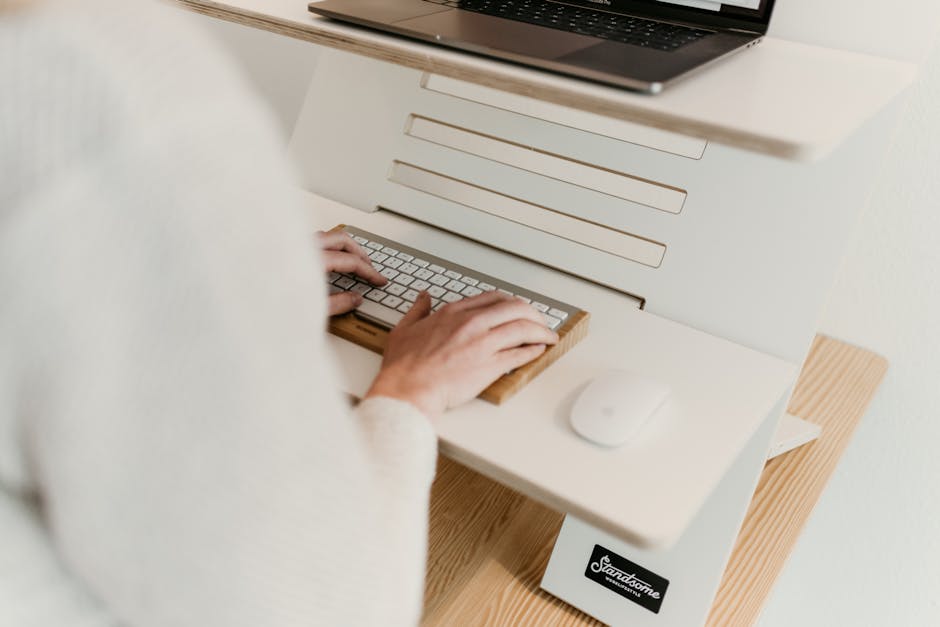 Image: Ergonomic adjustable desk setup for productive and comfortable remote work.
Key Takeaway: Personalize your space to create a comfortable and inspiring environment that reflects your personality and goals.
Essential Equipment for a Productive Bahraini Home Office
Equipping your home office with the right technology is essential for productivity and efficiency.
Computer & Peripherals: Choosing the right laptop or desktop, monitor(s), keyboard, mouse, and webcam.
- Laptop vs. Desktop: Choose a laptop for portability or a desktop for more power and expandability. Consider your specific needs and budget.
- Monitor(s): Invest in a high-quality monitor with good resolution and color accuracy. Consider a dual-monitor setup for increased productivity. A 27-inch monitor with a resolution of 2560x1440 (QHD) is a good starting point.
- Keyboard and Mouse: Choose an ergonomic keyboard and mouse that are comfortable to use and support your wrists.
- Webcam: Invest in a high-quality webcam for video conferencing. Look for a webcam with good resolution, low-light performance, and a built-in microphone.
Key Takeaway: Invest in reliable and ergonomic equipment to enhance productivity and comfort.
Internet Connectivity: Ensuring a stable and fast internet connection (reliable ISP, Wi-Fi setup, backup options).
A stable and fast internet connection is crucial for remote work.
- Reliable ISP: Choose a reliable internet service provider (ISP) with a proven track record. Batelco and STC Bahrain are two major ISPs in Bahrain.
- Wi-Fi Setup: Optimize your Wi-Fi setup for maximum speed and coverage. Use a Wi-Fi router with the latest technology (e.g., Wi-Fi 6) and position it in a central location.
- Backup Options: Consider a backup internet connection in case of outages. Options include a mobile hotspot or a second internet connection from a different ISP.
- Speed Test: Regularly test your internet speed to ensure you're getting the bandwidth you're paying for. Aim for at least 50 Mbps download speed and 10 Mbps upload speed for reliable video conferencing and file transfers.
Key Takeaway: Prioritize a stable and fast internet connection to avoid disruptions and maintain productivity.
Communication Tools: Headsets, microphones, and video conferencing software (Zoom, Microsoft Teams, Google Meet).
 Image: Hands typing on a laptop in a stylish home office, symbolizing modern remote work lifestyle.
Effective communication is essential for remote collaboration.
- Headsets: Invest in a high-quality headset with a noise-canceling microphone for clear communication.
- Microphones: Consider a dedicated microphone for improved audio quality during video conferences and recordings.
- Video Conferencing Software: Choose a video conferencing platform that meets your needs. Popular options include Zoom, Microsoft Teams, and Google Meet. Ensure you are familiar with the platform's features and settings.
Key Takeaway: Invest in reliable communication tools to facilitate seamless collaboration and communication.
Printing & Scanning: Choosing the right printer/scanner for your needs (all-in-one, laser vs. inkjet).
Evaluate your printing and scanning needs and choose the right equipment.
- All-in-One Printer: An all-in-one printer combines printing, scanning, and copying functionalities.
- Laser vs. Inkjet: Laser printers are generally faster and more cost-effective for high-volume printing. Inkjet printers are better suited for printing photos and documents with color.
- Wireless Connectivity: Choose a printer with wireless connectivity for easy access from multiple devices.
Key Takeaway: Select a printer/scanner that meets your specific needs and budget.
Power Management: Surge protectors, UPS (Uninterruptible Power Supply) for power outages in Bahrain.
Protect your equipment from power surges and outages.
- Surge Protectors: Use surge protectors to protect your electronic devices from voltage spikes.
- UPS (Uninterruptible Power Supply): Invest in a UPS to provide backup power during power outages. This will allow you to save your work and shut down your computer safely. Power outages are relatively common in Bahrain during the summer months due to increased electricity demand.
Key Takeaway: Protect your equipment from power fluctuations to prevent data loss and hardware damage.
 Image: Focused close-up of hands typing on a laptop keyboard, showcasing digital work and technology.
Budgeting and Sourcing Your Home Office Setup in Bahrain
Setting up a home office requires careful budgeting and strategic sourcing.
Determining Your Budget: Creating a realistic budget for your home office setup.
Create a realistic budget based on your needs and priorities. Consider these cost categories:
- Furniture: Desk, chair, storage
- Equipment: Computer, monitor(s), keyboard, mouse, webcam, printer/scanner
- Software: Video conferencing, productivity tools
- Internet Connectivity: Monthly internet bill
- Ergonomic Accessories: Footrest, wrist rest, monitor stand
- Acoustic Treatment: Acoustic panels, curtains, rugs
Key Takeaway: Create a detailed budget to avoid overspending and ensure you allocate resources effectively.
Sourcing Equipment: Local retailers (e.g., Ashrafs, Sharaf DG), online marketplaces (e.g., Amazon.ae, OpenSooq), and potential savings from importing.
Explore various sourcing options to find the best deals.
- Local Retailers: Ashrafs and Sharaf DG are popular electronics retailers in Bahrain.
- Online Marketplaces: Amazon.ae and OpenSooq offer a wide range of products at competitive prices.
- Importing: Consider importing equipment from overseas if you can find better deals. However, be mindful of shipping costs, import duties, and warranty considerations.
Key Takeaway: Compare prices from different sources to find the best deals on equipment and furniture.
Negotiating Prices: Tips for getting the best deals on equipment and furniture.
 Image: Man working remotely with headphones, reviewing documents, and video conferencing on laptop.
Negotiate prices whenever possible to save money.
- Ask for Discounts: Don't be afraid to ask for discounts, especially on bulk purchases or older models.
- Compare Prices: Compare prices from different retailers and use this information to negotiate a better deal.
- Look for Sales and Promotions: Take advantage of sales and promotions to save money on equipment and furniture.
Key Takeaway: Be proactive in negotiating prices to maximize your budget.
Financing Options: Exploring potential financing options for larger purchases (credit cards, personal loans).
Explore financing options for larger purchases if necessary.
- Credit Cards: Use a credit card with a low interest rate and rewards program.
- Personal Loans: Consider a personal loan from a bank or financial institution.
- Installment Plans: Many retailers offer installment plans that allow you to pay for your purchases over time.
Key Takeaway: Explore financing options carefully and choose the one that best suits your financial situation.
Legal and Regulatory Considerations for Remote Work in Bahrain
Understanding the legal and regulatory framework is crucial for both employers and employees engaged in remote work in Bahrain.
Understanding Bahraini Labor Law: Remote work contracts, employee rights, and employer obligations.
Bahraini Labor Law applies to remote work arrangements. Key considerations include:
 Image: Red-haired woman writing at a desk with a laptop, in a bright modern office setting.
- Remote Work Contracts: Ensure that your employment contract clearly defines the terms of your remote work arrangement, including working hours, performance expectations, and equipment responsibilities.
- Employee Rights: Remote workers in Bahrain are entitled to the same rights and benefits as office-based employees, including minimum wage, overtime pay, and social security contributions.
- Employer Obligations: Employers are responsible for providing a safe and healthy work environment for remote workers, even if it's their home office. This includes providing ergonomic equipment and ensuring compliance with safety regulations.
Key Takeaway: Familiarize yourself with Bahraini Labor Law and ensure that your remote work arrangement complies with all applicable regulations.
Data Privacy and Security: Protecting sensitive data and complying with Bahraini data privacy regulations.
Protecting sensitive data is paramount in a remote work environment.
- Data Encryption: Use data encryption to protect sensitive data stored on your computer and transmitted over the internet.
- Strong Passwords: Use strong passwords and update them regularly.
- Secure Wi-Fi: Use a secure Wi-Fi network with a strong password. Avoid using public Wi-Fi networks for work-related activities.
- Compliance with Bahraini Data Privacy Regulations: Comply with Bahraini data privacy regulations, such as the Personal Data Protection Law (PDPL), which governs the collection, processing, and storage of personal data.
Key Takeaway: Implement robust data privacy and security measures to protect sensitive information and comply with applicable regulations.
Tax Implications: Understanding the tax implications of remote work in Bahrain for both employees and employers.
Understand the tax implications of remote work in Bahrain.
- Income Tax: Bahrain does not currently have an income tax.
- Social Security Contributions: Both employers and employees are required to contribute to social security.
- VAT (Value Added Tax): VAT applies to certain goods and services related to remote work, such as internet services and equipment purchases.
- Consult a Tax Professional: Consult a tax professional for personalized advice on your specific tax situation.
Key Takeaway: Stay informed about the tax implications of remote work in Bahrain and seek professional advice as needed.
Insurance Coverage: Ensuring adequate insurance coverage for your home office (home insurance, liability insurance).
 Image: Open laptop on a wooden conference table with stylish black chairs in a modern office setting.
Ensure adequate insurance coverage for your home office.
- Home Insurance: Review your home insurance policy to ensure that it covers your home office equipment and liabilities.
- Liability Insurance: Consider liability insurance to protect yourself from potential lawsuits related to your remote work activities.
Key Takeaway: Review your insurance coverage and make sure you have adequate protection for your home office.
Maintaining Productivity and Well-being While Working Remotely in Bahrain
Remote work offers flexibility, but it also presents unique challenges to productivity and well-being.
Time Management: Creating a daily schedule, setting priorities, and avoiding procrastination.
Effective time management is crucial for remote work success.
- Create a Daily Schedule: Create a daily schedule that outlines your work hours, breaks, and personal time.
- Set Priorities: Identify your most important tasks and prioritize them accordingly.
- Avoid Procrastination: Break down large tasks into smaller, more manageable steps. Use techniques like the Pomodoro Technique to stay focused and avoid procrastination.
- Time Blocking: Allocate specific blocks of time for specific tasks.
Key Takeaway: Implement effective time management strategies to stay organized, focused, and productive.
Communication Strategies: Maintaining effective communication with colleagues and clients (regular check-ins, clear expectations).
Maintain effective communication with colleagues and clients.
- Regular Check-Ins: Schedule regular check-ins with your team to stay connected and informed.
- Clear Expectations: Clearly communicate your expectations and deadlines.
- Use Communication Tools: Utilize communication tools like email, instant messaging, and video conferencing to facilitate seamless communication.
- Active Listening: Practice active listening to ensure that you understand your colleagues' and clients' needs and concerns.
Key Takeaway: Prioritize clear and consistent communication to foster strong working relationships and avoid misunderstandings.
Combating Isolation: Staying connected with others, joining online communities, and attending virtual events.
Combatting isolation is crucial for maintaining mental well-being while working remotely.
- Stay Connected with Others: Make an effort to stay connected with friends, family, and colleagues.
- Join Online Communities: Join online communities related to your profession or interests.
- Attend Virtual Events: Attend virtual events, such as webinars and conferences, to network and learn new skills.
- Schedule Social Activities: Schedule regular social activities, even if they are virtual.
Key Takeaway: Actively combat isolation by staying connected with others and engaging in social activities.